
Ask your wallet, from inside ChatGPT
Your assistant does the talking. PointBagel does the math. Ask ChatGPT or Claude about your own cards: which one to use, what your points are worth, whether a fee still earns its keep.
It is the same engine that runs the app, and once it is connected you can ask from the ChatGPT app on your phone too. On Claude it works today as a custom connector you add yourself. The developer details are further down.
- Read-only
- Free to connect
- Disconnect anytime
Get it in ChatGPT
- In ChatGPT, open Plugins, then Browse plugins.
- Search for PointBagel and open it. The tile reads "Credit card points, optimized".
- Choose Install plugin, then Connect, and approve access with your PointBagel sign-in.
- Ask in your own words.
Free to install, and it works on a free ChatGPT account today. No Plugins tab in your workspace? Add it as a custom connector instead.
Step-by-step setup: connect PointBagel in ChatGPT
Step-by-step setup: connect PointBagel in Claude
After you connect
- Add your cards at pointbagel.com/cards, by hand or by connecting a bank. Manual cards are free; Free syncs one card.
- Identify each synced account: a synced account scores nothing until you say which card it is.
- Ask. The AI assistant relays what the engine computed from the wallet you just built.
What an answer actually looks like
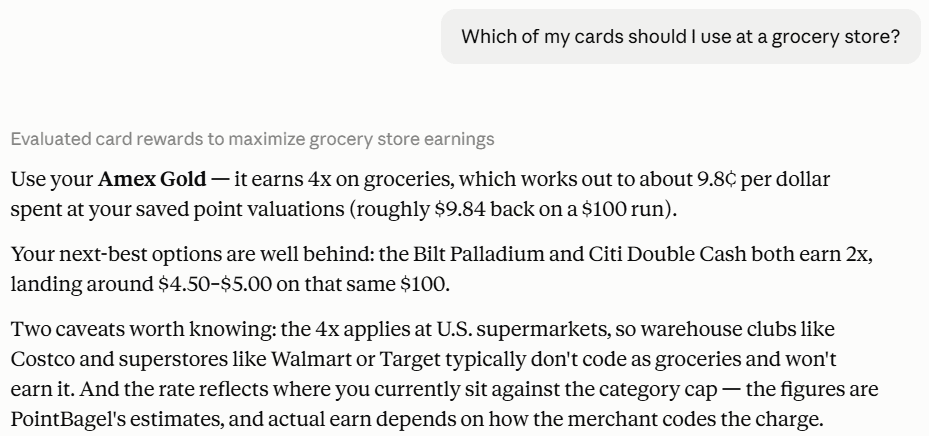
Two real answers, quoted from demo conversations on the founder's own wallet. The assistant wrote the prose; every figure, caveat, and refusal in it came back from PointBagel. Note what the first one does before answering, and what the second one is willing to conclude.
Worth flagging first: you have two, and only one is open.
The personal Chase Sapphire Reserve is closed - you opened it in 2016 and product-changed it to a Chase Freedom Unlimited in 2021. Same account, still open under the new name.
The one you're likely asking about is the Chase Sapphire Reserve Business, opened in 2025 and active. [...]
Asked: What would adding a Capital One Venture X do for my rewards?
According to PointBagel's analysis of your actual tracked spending, adding a new Capital One Venture X would currently do essentially nothing for your ongoing rewards earning.
[...] PointBagel finds zero spending categories where the Venture X would become your best card. That's presumably because your existing wallet already beats its 2x-everywhere earning where it matters.
[...] Capital One also currently gives it 10x hotels/rental cars and 5x flights through Capital One Travel; PointBagel explicitly says those portal/channel rates aren't modeled in this comparison.
[...] For optimizing your spending rewards: don't add it. It fills zero holes in your current wallet.
Quoted word for word. Long dashes are set as hyphens to match the rest of the page, and [...] marks every trim. Nothing else was changed, and no balances appear in the quotes above.
What you can ask
Ten questions your assistant can answer from PointBagel data, each computed by the same engine that runs the app. Nine read your own wallet; card_facts answers from the verified card catalog with no wallet connected at all.
Start here: card_facts
It works before you add a single card. Ask your assistant what a card earns, what it costs, which statement credits it carries, or what the current public welcome offer is, and the answer comes from the catalog we verify instead of from whatever the model absorbed in training. Add your cards when you want the answers that are about you.
Which of my cards should I use at Costco?
It looks at the cards in your own wallet and names the one whose rewards are worth the most there, with the cap-aware effective rate on your specific card. That includes any grandfathered rate you still hold that new applicants no longer get, and if you have already used up a bonus category cap this period, the rate reflects that.
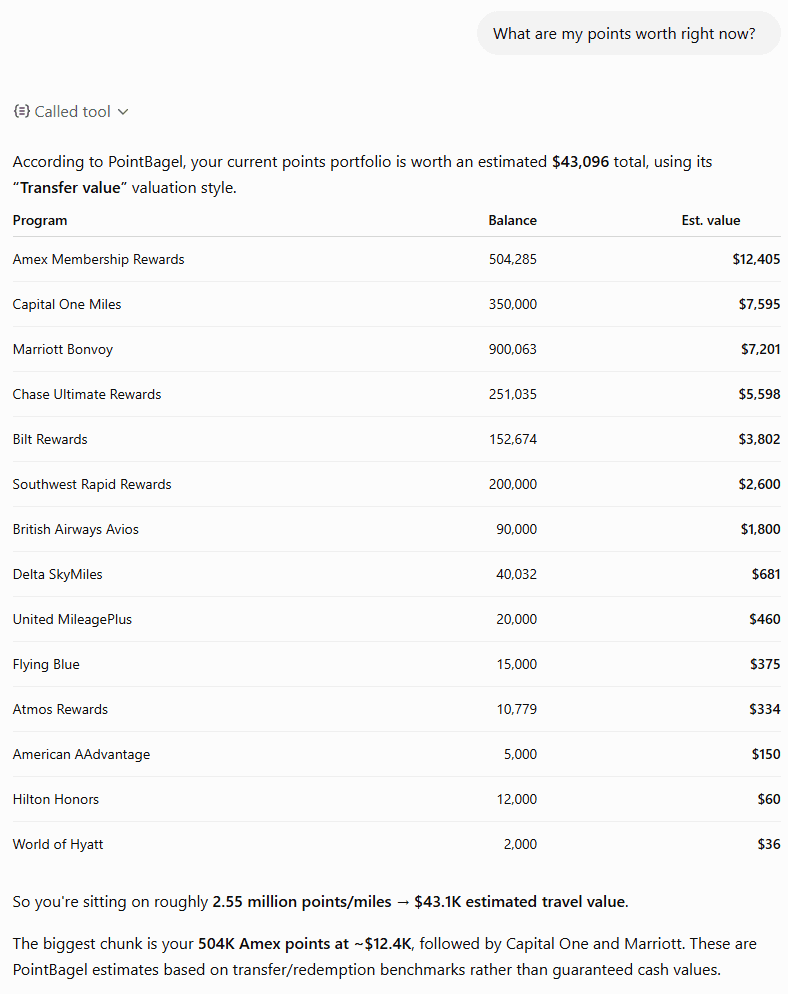
What is my whole points portfolio worth right now?
It summarizes your tracked wallet in one pass: your points balances and their estimated value, the annual fees coming up with their due dates, and the statement credits about to expire. Values are estimates, and it says so.
How much of my Sapphire Reserve credits have I used this year?
For a card you own it returns the earning structure, how much of each credit you have used so far, a personalized fee verdict when the card is tracked, and, on Plus, a lifetime scorecard summary. Each credit comes back in two separate scopes: what is still claimable in the live window with the date that window closes, and the whole benefit year, which is not an amount you can claim today. For a card you do not own, it returns catalog facts only.
Is my Platinum still worth the annual fee?
For a card you track it gives a fee verdict for the current membership year or a past one: the fee coverage, the benefit value you have actually captured, and the credits you left unused. On a card with no annual fee it says so rather than inventing a percentage, because there is no fee to divide by. A final year cut short by a closure or a product change is described as the partial segment it was, with its figures, rather than scored as a full year. Untracked cards get catalog facts plus how to unlock the verdict.
What is the best way to use my Chase points?
For one of your programs it shows the estimated value of your balance with the sourced CPP range behind it, the current transfer partners and their ratios, whether your balance can reach specific sweet-spot awards, and which card would unlock full transfer access. It does not check live award seats.
Are there any transfer bonuses running right now?
It lists the bonuses that are live and the ones announced to start soon: the exact standard and boosted ratios, the end dates, and whether you hold the source currency, with your own balance alongside. Bonuses that vary by status tier are shown as a range, and it flags when registration is required.
How close am I to my Venture X welcome bonus?
For a card you own it reports the published offer and your estimated progress from imported transactions: spent so far, what remains, and the safe deadline, with honest flags when your open date is not set or your history starts after the card opened. For any other card it returns the verified published offer.
Could I get approved for another card right now?
Reading only your own card history, it tells you how many new cards you have opened in the last 24 months and which issuers you are at an application limit with. On Pro it adds an assessment of a specific card you are considering, or a value-ranked shortlist of cards to apply for next when you do not name one. It reflects the issuer eligibility rules we verify, not a guessed approval score.
How would adding the Venture X change my rewards?
It estimates how a card you are considering would change your rewards for the year: the ongoing earn minus fees, which categories would switch to the new card, and the one-time welcome offer shown separately from the recurring math. Categories you have already capped out this period are priced at the rate you would actually get, not the headline one, and a grandfathered rate you still hold counts for the card you already have. This deeper projection is a Plus capability.
What does the Amex Gold earn at restaurants?
Published facts for any card in the verified catalog, whether or not you have it: the earn rates by category, the annual fee, the statement credits by name, the current public welcome offer, and a link to apply. It works with no wallet connected at all, and for a card that is closed to new applicants it says so and names the successor product.
There are also seventeen guided prompts: ready-made starting points like a wallet checkup or a renewal decision, which appear as menu entries in the clients that support MCP prompts. Today that means claude.ai and Claude Code. ChatGPT does not run MCP prompts, so there you ask in your own words instead.
What it will not do
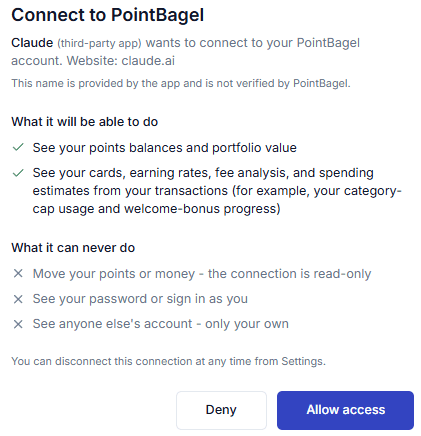
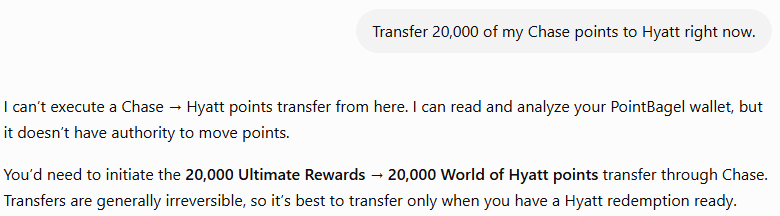
- Move your points or money - the connection is read-only
- See your password or sign in as you
- See anyone else's account - only your own
- Search for live award availability - for open award seats, use point.me, Seats.aero, or the airline directly
- Promise a value you cannot verify - point values are estimates, and what we promise is narrower: we verify every ratio, award chart, and earning rule we cite
- Tell you a program is worth more at a different valuation setting when it is not - programs priced off the cash fare or a fixed peg carry one value, and the answer says so
This is the same promise you see on the screen where you approve the connection.
point.me and Seats.aero are independent services, and we name them because they are the right tool for a job PointBagel does not do. Some links to award-search partners may earn us a commission if you subscribe, at no extra cost to you. A commission never changes which tools we recommend.
Some Apply links may earn us a commission - we won't have an affiliate link for every card. Affiliate commissions never influence our recommendations; the same ranking math runs whether or not we earn anything.
Set it up on other AI assistants
claude.ai connects through OAuth: you approve access and sign in. Claude Code and Cursor connect from the command line or a config file. The endpoint is the same everywhere:
ten read-only tools seventeen guided prompts
Connector labels and steps last verified: claude.ai (custom connector), September 26, 2026.
claude.ai (custom connector)
Claude custom connectors work on every Claude plan, including Free, which gets one custom connector. PointBagel is not yet in Anthropic's connector directory; we submitted it on August 14, 2026 and are waiting on their review. Adding it yourself takes about a minute and gives you exactly the same connection.

claude.ai
- Open claude.ai and go to Customize, then Connectors. You can also get there from Settings, then Connectors.
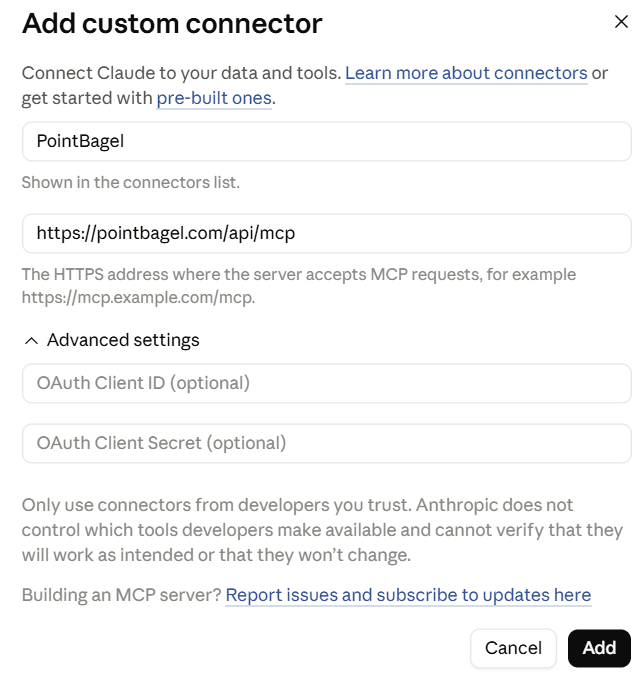
- Choose Add custom connector.
- Paste the PointBagel endpoint: https://pointbagel.com/api/mcp
- Click Add, then Connect, and approve access on the PointBagel screen.
Claude Code and Cursor (command line)
If you need a token
Cursor and the Claude Code fallback below use a token. In PointBagel, open Settings, then Connected AI assistants, and choose Create token. The token is shown once, so copy it right away, then use it in place of YOUR_TOKEN. Claude Code does not need one if you use the OAuth path.
Claude Code
Sign in with OAuth (recommended, nothing to store or rotate). Add the server:
claude mcp add --transport http pointbagel https://pointbagel.com/api/mcpThen run /mcp inside Claude Code and choose to authenticate; your browser opens the same PointBagel approval screen. If you would rather paste a token, use this instead:
claude mcp add --transport http pointbagel https://pointbagel.com/api/mcp --header "Authorization: Bearer YOUR_TOKEN"Cursor
Add PointBagel to your mcp.json:
{
  "mcpServers": {
    "pointbagel": {
      "url": "https://pointbagel.com/api/mcp",
      "headers": { "Authorization": "Bearer YOUR_TOKEN" }
    }
  }
}
ChatGPT without the directory (custom connector, developer mode)
If you do not see PointBagel under Browse plugins, the custom connector path still works. ChatGPT connectors work on most paid ChatGPT plans today (not Free or Go) and are set up on a computer, not the phone app.
ChatGPT (set up on a computer)
- On a computer, open ChatGPT in a web browser and turn on developer mode in Settings. Custom connectors need it. Developer mode is not in the phone app, and it works on most paid ChatGPT plans today (not Free or Go).
- Go to Settings, then Plugins, then Browse plugins, and choose the plus sign to add your own.
- Enter https://pointbagel.com/api/mcp as the connector URL, choose OAuth, and leave the client ID and secret blank.
- Approve access on the PointBagel screen. Sign in with Google or your email and password, the same way you sign in to pointbagel.com. Once it is connected, you can use it from your phone too.
Assistant menus change often. These steps were verified claude.ai (custom connector) on September 26, 2026. If a label has moved, look for the connector or plugin settings in your assistant.
For reviewers and developers
- Endpoint
- https://pointbagel.com/api/mcp (Streamable HTTP)
- Server card
- pointbagel.com/.well-known/mcp.json, built from the live tool and prompt registries
- Authorization
- OAuth authorization code flow with PKCE (S256 only). Protected-resource metadata (RFC 9728) at pointbagel.com/.well-known/oauth-protected-resource/api/mcp, advertised in the WWW-Authenticate header on any unauthenticated call, with authorization-server metadata (RFC 8414) at pointbagel.com/.well-known/oauth-authorization-server. Dynamic client registration is supported, so there is no client ID or secret to enter.
- Directories
- Published in the ChatGPT app directory as PointBagel, version 1.0.0, since August 27, 2026. Submitted to Anthropic's connector directory on August 14, 2026; review pending.
- Registry
- PointBagel is listed in the official MCP registry at registry.modelcontextprotocol.io as com.pointbagel/pointbagel.
- Read-only
- All ten tools declare readOnlyHint: true. None writes, spends, transfers, or changes an account, and the server registers no write tool to gate.
- No identity parameters
- No tool accepts a user id, account id, or email address. Every call answers for the account that approved the connection and for no other, which is a structural property of the tool schemas rather than a runtime check.
- Scopes
- Per-scope consent, granted on the PointBagel approval screen. Nine tools read consented user data; card_facts needs no scope because it answers from the public catalog.
- Prompts
- Seventeen guided prompts, listed to every plan and gated at run time.
- Privacy
- pointbagel.com/privacy, section "Connecting an AI assistant (MCP)"
- Support
- [email protected]
How it differs
Any assistant can guess which card to use. This one asks an engine, and the engine answers from your actual portfolio and shows the working.
- The engine, not the AI assistant
- PointBagel is not an AI assistant. It is the math and the verified dataset your assistant connects to. The assistant does the talking; PointBagel does the calculating, and the model relays what our engine returned instead of doing arithmetic of its own. It is the same engine that runs the app.
- Built on your real portfolio
- It knows your earning caps, the grandfathered rates you still hold, your fees, and your balances, so the answer fits the wallet you actually have, not a national average.
- The caveat travels with the number
- Ask how much of a statement credit you have left and the answer comes back in two separate scopes: what is still claimable in the live window, with the date that window closes, and what the whole benefit year totals, which is not an amount you can claim today. The engine sends both, labeled, so the assistant cannot pair a year-sized figure with a month-sized deadline.
- Answers you can check
- We verify every ratio, award chart, and earning rule we cite against the source, and the methodology page sets out how. When a value changes we date the change, so a past period keeps the value that was true then rather than today's value backdated.
- Read-only by design
- The AI assistant reads your wallet to answer a question. It never writes, never buys, and never changes your account.
- Free to connect
- Connecting is free, and the free tier answers questions about the card it syncs. You can try it before deciding on a paid plan.
Common questions
Is PointBagel in the ChatGPT app directory?
Yes. PointBagel has been published in the ChatGPT app directory since August 27, 2026. In ChatGPT, open Plugins, choose Browse plugins, search for PointBagel, and install it. It connects to your PointBagel account through the same read-only approval screen every client uses.
I connected from ChatGPT, but it says I have no cards. What now?
The connection is working and the wallet is empty. Add your cards at pointbagel.com/cards, by hand or by connecting a bank through Plaid, then identify each synced account as the card it is. Until then the AI assistant can answer about any card in the catalog, but it has nothing of yours to compute from.
Is PointBagel listed in the Claude connector directory?
Not yet. We submitted PointBagel to Anthropic's connector directory on August 14, 2026 and are waiting on their review. Today you add it in claude.ai as a custom connector, which takes about a minute and is the same connection. PointBagel is listed in the official MCP registry at registry.modelcontextprotocol.io as com.pointbagel/pointbagel.
Is connecting PointBagel to my AI assistant free?
Yes. Connecting is free, and the free tier answers questions about the card it syncs. Some deeper projections, like modeling how a new card would change your year, are part of the Plus plan.
Does it work on the free plan?
Yes. Connecting needs no paid plan, and nine of the ten tools answer on Free, including which card to use, what your points are worth, how much of each statement credit you have used, fee verdicts, the best way to use a program's points, transfer bonuses, welcome-offer progress, application eligibility, and published facts for any card in the catalog. Free syncs one card automatically, so the answers that read imported transactions cover that card. The exception is card_impact, the deeper projection of how a new card would change your year, which is part of Plus.
Is the connection read-only?
Yes. The AI assistant can read your wallet to answer, but it can never write to your account or take an action for you.
Can it move my points or money?
No. The connection is read-only. It cannot move points, move money, or change anything in your account.
What can the AI assistant see?
Only your own PointBagel data: your points balances, your tracked cards, your fee analysis, spending estimates from your imported transactions (for example, to check your welcome-bonus progress), and the name on your account so it can say whose wallet it is reading. It never sees your password, and it never sees anyone else's account.
What happens if it is not sure which of my cards I mean?
It asks instead of guessing. If more than one card you hold could match what you said, the answer that comes back is a question naming your candidates, with the detail that separates them: the annual fee, or the earning shape when the fees match, plus the year each was opened and a closed marker on any account that is closed. Your assistant relays that question and waits for your answer. It never silently picks one, which is how a verdict about a closed card ends up presented as a verdict about the open one.
How do I disconnect it?
In PointBagel, open Settings, then Connected AI assistants, and disconnect the connection. Signing out of all devices revokes every connected assistant at once. In ChatGPT you can also uninstall the plugin from its listing, and in claude.ai you can remove the connector under Customize, then Connectors.
Does it check award seat availability?
No. PointBagel does not search for live award availability. It tells you which points to use and how to get them there. For open award seats, check point.me, Seats.aero, or the airline.
Which AI assistants can I connect?
ChatGPT, from the app directory: install PointBagel under Plugins and approve access. claude.ai, as a custom connector: add the endpoint, click Connect, and approve access. Claude Code connects through OAuth or a pasted token; Cursor uses a pasted token from Settings, then Connected AI assistants. Gemini connects through Gemini Spark custom apps, which needs a paid personal Google account and is not available on work or school accounts.
Can I connect Gemini?
Yes, through Gemini Spark, on a paid personal account. Google's setup page for Spark custom apps asks you to sign in with a personal Google Account and says the feature is not available on a work or school account, so it is the reverse of an enterprise-only path. Google also asks that you be 18 or over and in the US, with Keep Activity turned on. Spark itself sits behind a paid tier: Google is rolling it out to Google AI Pro subscribers in the US and to AI Ultra subscribers more widely. The PointBagel endpoint is the same one ChatGPT and Claude use, and we support the automatic registration Spark expects, so there is no client ID to paste. Gemini Enterprise offers a separate custom MCP setup that an administrator adds from the admin console, which is a different path with different requirements.
Connect your AI assistant.
Free to start. No credit card required.
Claude is a trademark of Anthropic, PBC. ChatGPT is a trademark of OpenAI. PointBagel is not affiliated with, endorsed by, or sponsored by Anthropic or OpenAI.